How to recover a hacked Instagram account
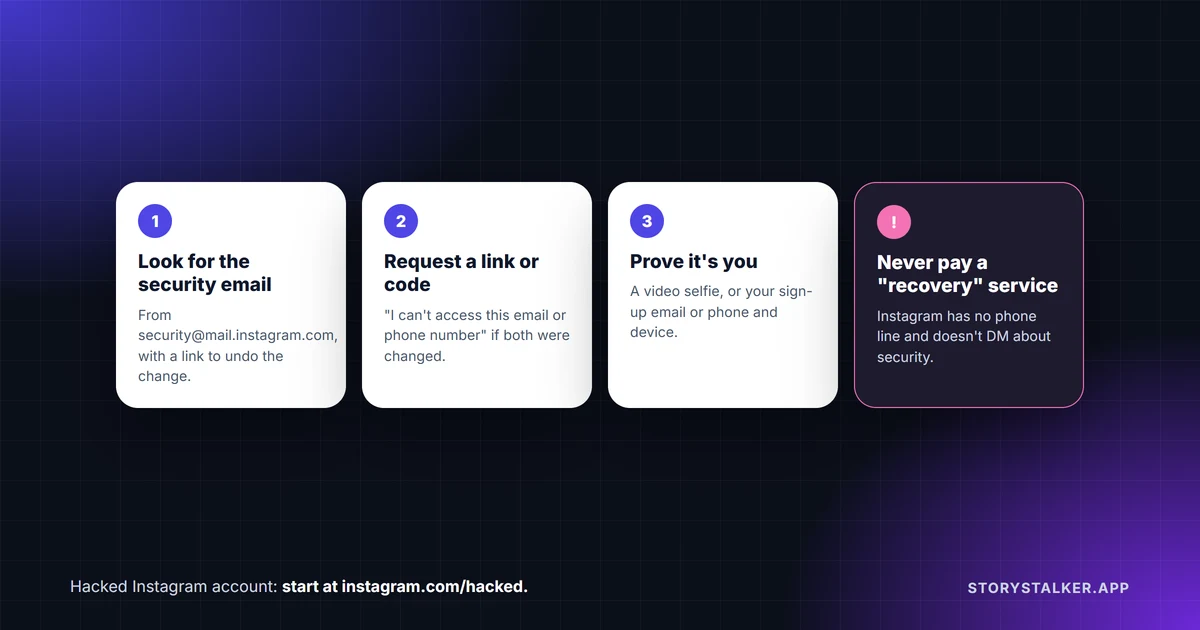
Go to instagram.com/hacked, or tap "Forgot password?" on the app's login screen, and work through Instagram's own steps in order. "If someone gains access to your account or you're unable to log into your account, visit www.instagram.com/hacked to secure your account," Instagram's Help Center says.1 Instagram also notes that "Some of these recovery steps may not be available to you depending on the type of account you're trying to recover, but we recommend trying them all."2
Don't pay anyone who offers to get your account back. Instagram's recovery steps are free and on its own Help Center, Meta has no general public phone line for customer service, and Instagram never contacts people about account security through DMs.2 3 4
If you can still log in
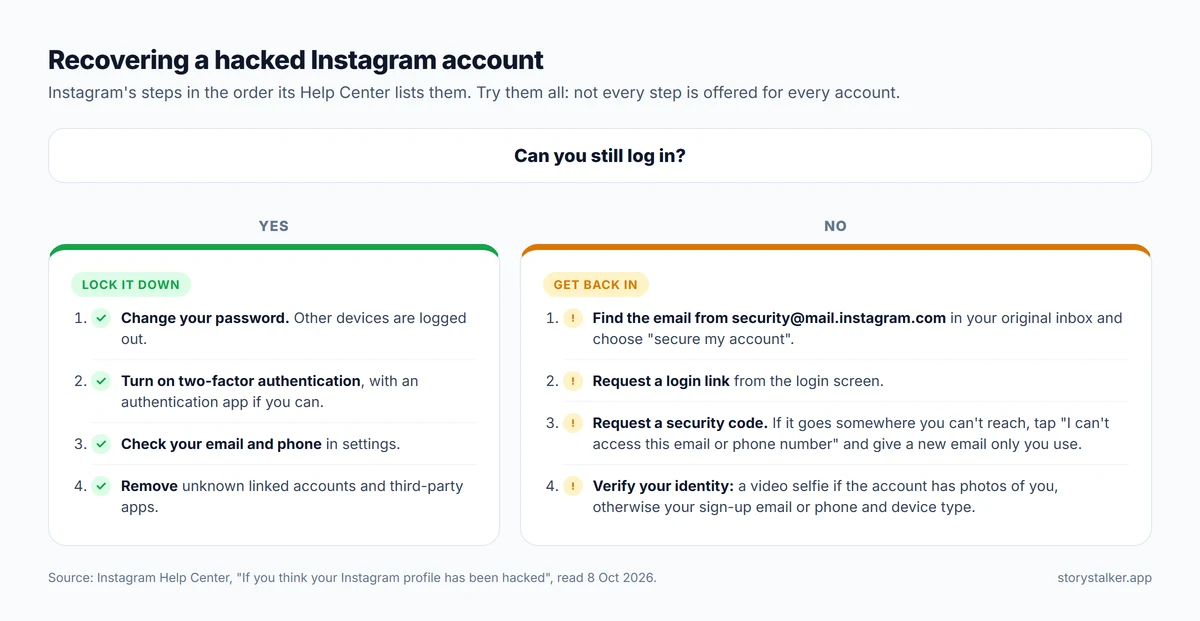
Act before the hacker locks you out:2 5
- Change your password. "Whenever you change your Instagram password, any devices logged into your Instagram account will automatically be logged out."5
- Turn on two-factor authentication, ideally with an authentication app, which Instagram marks as recommended.6
- Check that the email address and phone number in your settings are yours.2
- Remove anything you don't recognise in Accounts Center, including linked accounts, and revoke access for suspicious third-party apps.2
If the hacker changed your email address
Check your email for a message from security@mail.instagram.com (it's worth checking your spam folder too). "If you received an email from security@mail.instagram.com letting you know that your email address was changed, you may be able to undo this change by selecting secure my account in that message."2
When an email address is changed, Instagram sends two emails: one to the old address to deny the change, and one to the new address to allow it.7 The one that matters is the one in your original inbox.
If your email account itself was hacked, recover that first. Instagram is blunt about this: "Instagram can't provide any assistance with helping you get back into your email account."8
If the hacker changed your email and your phone number
Even if both were changed, Instagram has a path for it. On the login screen:2
- Tap Get help logging in (Android) or Forgot password? (iPhone) and enter your username, email or phone number.
- Tap Can't reset your password?, then Need more help? if it appears.
- Choose to send a security code. If the code goes somewhere you can't reach, tap I can't access this email or phone number.
- Enter a new email address that only you can access, and follow the prompts.
Instagram then asks you to prove who you are, in one of two ways:2
- If your account has photos of you, you'll take a video selfie "of you turning your head in different directions to help us check that you're a real person and confirm your identity." Instagram says the video "will never be visible on Instagram and will be deleted within 30 days." If it can't confirm you, you can submit another.
- If it doesn't, you'll get an email asking for "the email address or phone number you signed up with and the type of device you used at the time of sign up."
In the UK, the EU and South Korea, Meta added an option in 2025 to verify with "a video selfie" that uses facial recognition, compared against the account's profile pictures. Meta says it's "optional" and that it deletes facial data "as soon as it's no longer needed."9
Meta said in December 2025 that new account hacks on Facebook and Instagram fell "by more than 30% globally" over the previous year, and that the relative success rate of hacked account recovery rose by more than 30% in the US and Canada.10 Those are Meta's own figures, and relative ones, but they suggest the official route is worth sticking with.
How to tell a real Instagram message from a fake one
Most hacks start with a fake message, so it helps to know what Instagram actually sends:4
- Security messages only come by email, from addresses ending in @support.facebook.com, @support.instagram.com, @facebookmail.com, @mail.instagram.com or @global.metamail.com.
- Never by DM. "Instagram will never reach out to you about profile security through Direct Messaging."
- You can check. In the app, open Menu, then Meta Account, Login and security and Recent emails to see every official email from the last 14 days. If a recent security message isn't listed there, treat it as suspicious.
Don't pay for recovery
Treat anyone who comments "DM me, I recovered my account" under posts, and any website that charges to "recover" accounts, as a scam aimed at someone who has just been scammed once. Meta says it "does not have a general public phone number available for customer service," and that "Phone numbers claiming to be for Meta customer support are potentially scams and should be avoided."3 The FTC has warned about people who lost money being targeted again by scammers who "said they could trace and recover lost money...for a fee."11
What about paying Meta? Meta Verified, Meta's paid subscription, includes support from human agents by chat and email, with phone support on its higher plans, and "Support requests from Meta Verified subscribers are prioritized." Its help page says "If you were hacked or lost access to your Meta Verified account, we can help you secure it."12 That's faster support for active subscribers, not a promise to restore an account.
What the 2026 support-tool hack showed
In May 2026, attackers abused Meta's AI-assisted recovery tool, called High Touch Support, to reset passwords on other people's Instagram accounts. Meta's breach notice, as reported by BleepingComputer, said it discovered the problem on 31 May 2026, and 20,225 accounts were taken over. The tool didn't check that the email address the attacker supplied belonged to the account. Meta said attackers could log in only to accounts that didn't have two-factor authentication turned on.13
That's the strongest argument we know for turning on two-factor authentication today.
How to stop it happening again
- Use two-factor authentication, with an authentication app if you can. Instagram also offers backup codes for logging in when you can't get a code, so keep them somewhere safe.6
- Turn on login alerts and review where your account is logged in.14
- Don't reuse your Instagram password anywhere else.14
- Don't give your login to apps that promise followers or likes. Instagram warns against exactly this.5
Frequently Asked Questions
Can I recover my Instagram account if the hacker changed my email and phone number?
Instagram has a path for it. Use I can't access this email or phone number during the security code step, give a new email only you can access, and complete the identity check, either a video selfie or your sign-up details and device type.2
Does Instagram have a phone number I can call?
Not a general one. Meta says it "does not have a general public phone number available for customer service," and numbers claiming to be Meta support are "potentially scams."3 Higher Meta Verified plans include phone support for subscribers.12
What happens to my video selfie?
Instagram says the video "will never be visible on Instagram and will be deleted within 30 days."2
Will Instagram message me about a hacked account?
Not by DM. Security messages come by email, and you can check them under Recent emails in your settings.4
Does Meta Verified get my account back?
It gets you prioritised human support if you were already subscribed. Meta says it can help "secure" a hacked Meta Verified account, which isn't a guarantee of recovery.12
Should I use a recovery service?
No. Instagram's own recovery steps are free,2 and the FTC has warned about scammers who offer to "trace and recover lost money...for a fee."11
Sources
All pages were read on 8 October 2026. Help Center pages show no revision date.
- Instagram Help Center, Hacked Instagram Account.
- Instagram Help Center, If you think your Instagram profile has been hacked.
- Instagram Help Center, Phone support availability on Instagram and other Meta Company Products.
- Instagram Help Center, Review recent emails sent from Instagram.
- Instagram Help Center, What to do if your Instagram profile posts unauthorized content.
- Instagram Help Center, Securing your Meta Account with two-factor authentication.
- Instagram Help Center, What to do if the email for your Instagram account was changed.
- Instagram Help Center, Lost access to email or phone number linked to Instagram account.
- Meta Newsroom, Testing New Ways to Combat Scams and Help Restore Access to Compromised Accounts, 21 October 2024, updated 4 March 2025.
- Meta Newsroom, Making it Easier to Access Account Support on Facebook and Instagram, 4 December 2025.
- FTC Data Spotlight, Reported losses to scams on social media eight times higher than in 2020, April 2026.
- Instagram Help Center, Contact Meta Verified support for your verified profile.
- BleepingComputer, Over 20,000 Instagram accounts stolen in Meta AI support hack, Sergiu Gatlan, 8 June 2026.
- Instagram Help Center, Avoid getting scammed on Instagram.
The StoryStalker editorial team
StoryStalker runs a viewer for public Instagram content, so we follow how Instagram works and how it changes more closely than most people would want to. Each guide is built from Instagram's Help Center, Meta's announcements and developer documentation, and named reporting, and every claim links to the page it came from. When Instagram doesn't document something, we say so instead of guessing. Spotted something out of date? Tell us and we'll fix it.
Published October 20, 2026 · How we work
Keep reading
Can you view a private Instagram account?
Not without being an approved follower. What a private profile shows to anyone, what it hides, how private viewer sites make money, and the one real leak.
8 min readRestrict vs block vs mute on Instagram
Mute changes what you see. Restrict quietly fences off someone's comments and messages. Block cuts contact. What each does, and what the other person can tell.
8 min readHow to download your Instagram data
Export a copy of your photos, videos and messages from Accounts Center. The steps, HTML or JSON, why it can take up to 30 days, and the 4-day download window.
6 min read