How to download your Instagram data
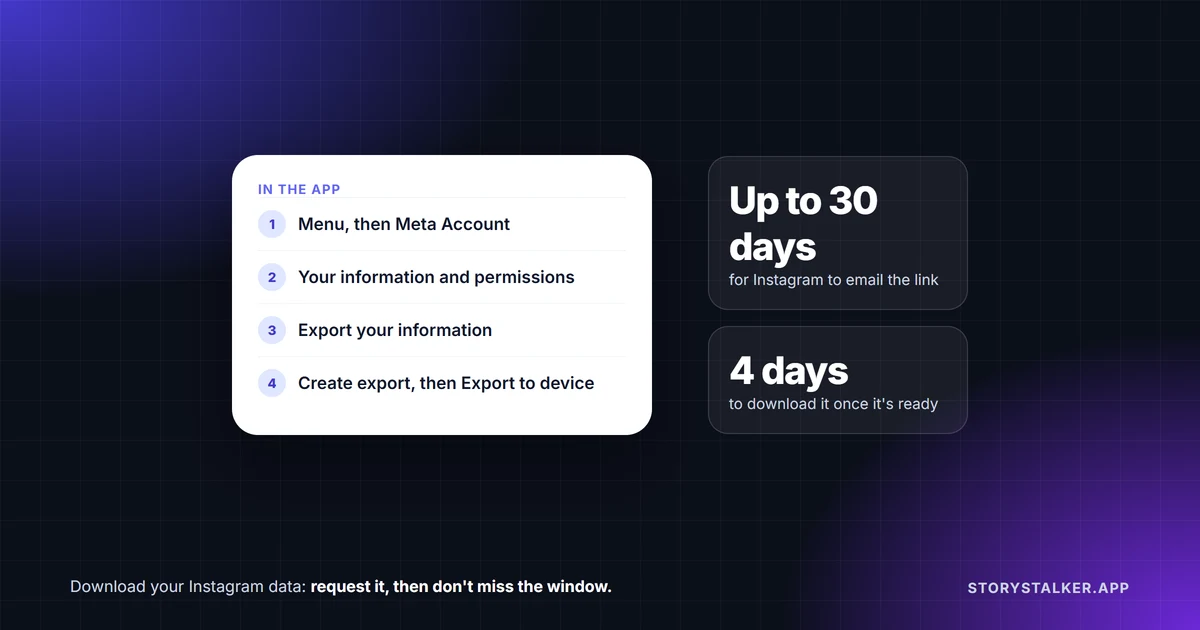
Instagram calls it "Export your information," and it lives in Accounts Center, which you reach through Meta Account in Instagram's menu. You choose what to include, Instagram prepares a file, and you get an email when it's ready. Two numbers matter: "It may take up to 30 days for us to email you an export link," and once it's ready, "you'll have 4 days" to download it.1
It covers your own account only. You can't export someone else's posts this way.
How to export your Instagram data
In the Instagram app, on iPhone or Android:1
- Go to your profile and tap Menu in the top right.
- Tap Meta Account, then Your information and permissions.
- Tap Export your information, then Create export.
- Choose your Instagram profile and tap Next.
- Choose Export to device.
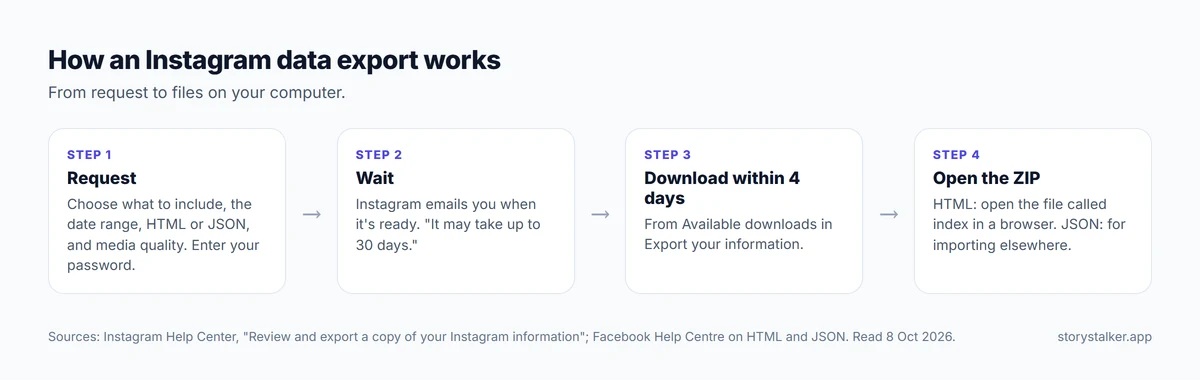
- Pick what to include, the date range, the format, the email address to notify and the media quality, then tap Start export.
On a computer, click More in the bottom left, then Settings, and follow the same path from Meta Account.1 Some accounts still see "Accounts Center" instead of "Meta Account." Instagram says it's "gradually updating people to Meta Accounts."1
Instagram says "Exporting your files is a password-protected process that only you have access to."1

The choices, explained
What to include. Instagram offers two options. "Available information" includes "information and activity for the accounts and profiles you selected but won't include data logs." "Specific types of information" includes all of that "as well as data logs," and lets you pick only certain things, "such as photos, messages or data logs."2 If you only want your photos and videos, choosing just those makes the file smaller.1
Format: HTML or JSON. Instagram's page lists format as a choice without defining it. Meta's Facebook Help Center defines the two formats Meta offers for exports. HTML is "An easy-to-view format": you get a ZIP file containing "an HTML file named index that you can open like a web page on your web browser." JSON is "A machine-readable format" for moving your information to another service.3 If you just want to look through your history, choose HTML.
Media quality. Higher quality means bigger files. Instagram notes that "files with high-quality videos are larger," and that you need enough storage space on your device.1 For a real backup of your photos and videos, choose the highest quality.
Date range. Useful if you only want recent posts, or want to split a large account into smaller downloads.
What it won't include
- Deleted content. "Some information you have deleted may be stored temporarily for safety and security purposes, but will not appear when you access or download your information."1
- Anyone else's posts. The export is your information: what you posted, sent and did. For someone else's public Reel, see how to download Instagram Reels.
- A full list on the Help Center. Instagram's page describes the two options and gives examples such as "photos, messages or data logs," but doesn't list every category.2 Choosing Specific types of information lets you pick from what's available.
Sending it somewhere other than your phone
Instead of Export to device, you can choose Export to external service, connect the service, and pick how often to export.1 Meta announced in October 2023 that this option was coming to Instagram: "you can now transfer all of your Instagram photos and videos to other services."4 The services on offer are listed on that screen; Instagram's Help Center doesn't name them.
If you can't log in
"If you can't access your Instagram Account and still want to export a copy of your information, you can contact us," Instagram says.1 If your account was hacked, recover it first through instagram.com/hacked, then export.
Frequently Asked Questions
How long does an Instagram data download take?
Instagram says "It may take up to 30 days for us to email you an export link."1 Some exports arrive sooner, but Instagram doesn't promise less. Guides that quote 48 hours or 14 days don't match Instagram's current page.
How long is the download link valid?
Four days. "When your export is ready, you'll have 4 days to export your information."1 After that, request a new export.
Should I choose HTML or JSON?
HTML if you want to browse it: open the file called index in your web browser. JSON if you're moving the data into another service or app.3
Does the export include my DMs?
Messages are one of the types you can choose.2 Tick them under Specific types of information.
Does it include photos I deleted?
No. Deleted information "will not appear when you access or download your information."1
Can I download Facebook and Instagram data at the same time?
Meta says so. When it moved the tool into Accounts Center in October 2023, it said "you can now download information for your Facebook and Instagram accounts at the same time."4
Sources
All pages were read on 8 October 2026. Help Center pages show no revision date.
- Instagram Help Center, Review and export a copy of your Instagram information.
- Instagram Help Center, Information available to download from your Instagram profile.
- Facebook Help Center, Export a copy of your Facebook information, for the HTML and JSON definitions used by the same Accounts Center tool.
- Meta Newsroom, Making It Easier To Manage Your Information Across Meta's Apps, Robert d'Apice, 17 October 2023.
The StoryStalker editorial team
StoryStalker runs a viewer for public Instagram content, so we follow how Instagram works and how it changes more closely than most people would want to. Each guide is built from Instagram's Help Center, Meta's announcements and developer documentation, and named reporting, and every claim links to the page it came from. When Instagram doesn't document something, we say so instead of guessing. Spotted something out of date? Tell us and we'll fix it.
Published July 15, 2026 · Updated October 8, 2026 · How we work
Keep reading
Why are my Instagram videos blurry?
Some blur you can fix with one setting and the right export. Some you can't: Instagram moves videos nobody is watching to lower quality.
7 min readCan you see who viewed your Instagram Reel?
No. Reel insights give counts, not names, including the confusingly named Viewers metric. What you can see, who can see your likes, and what a view counts.
6 min readRestrict vs block vs mute on Instagram
Mute changes what you see. Restrict quietly fences off someone's comments and messages. Block cuts contact. What each does, and what the other person can tell.
8 min read