How to spot Instagram scams in your DMs
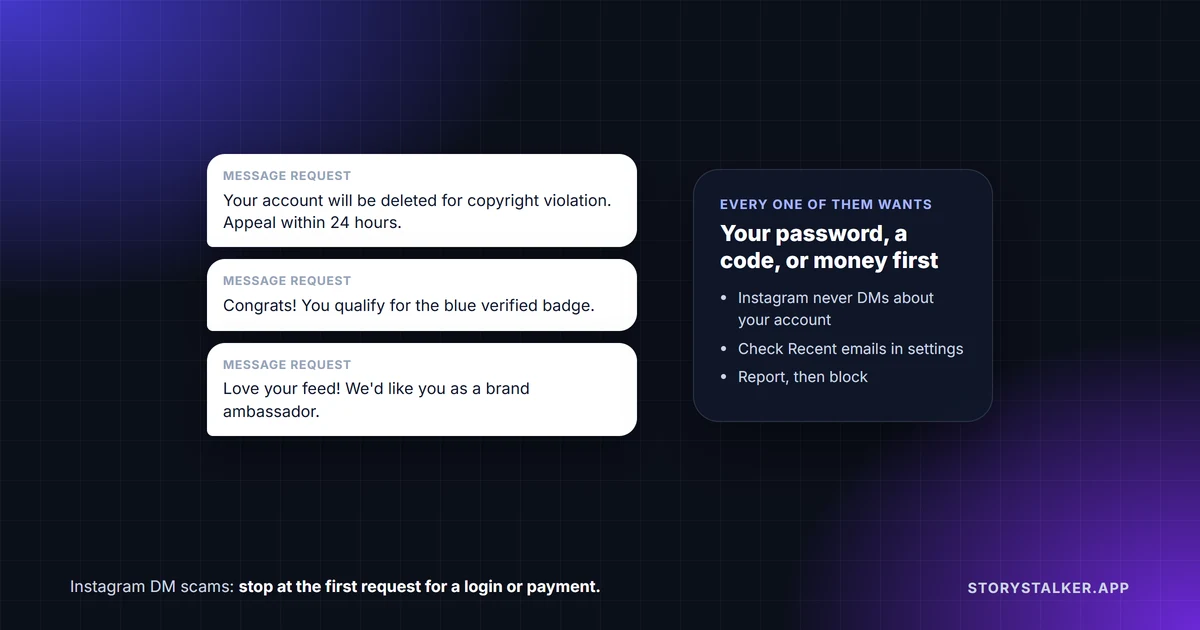
Instagram doesn't contact you about your account by DM. "Instagram will never send you direct messages about your account in the Instagram app," its Help Center says.1 So a DM that claims to be from Instagram, threatens to delete your account, or offers you a verified badge is a scam, whoever it looks like it's from.
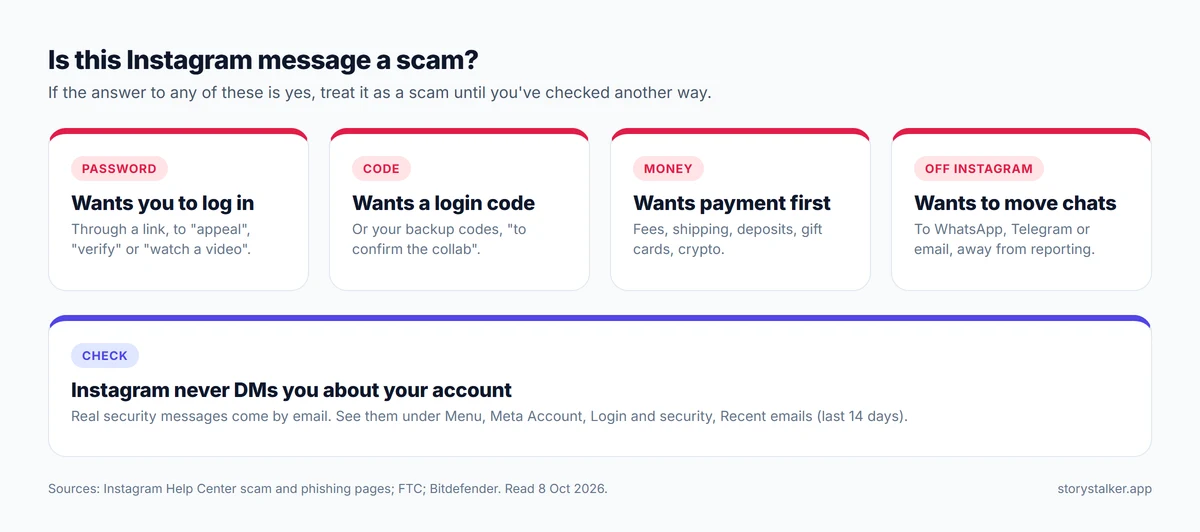
Many scams on Instagram build up to one of four requests: your password, a login code, money paid up front, or a move to another app. If a message is heading towards any of those, stop.
People in the US reported losing $2.1 billion in 2025 to scams that started on social media, about eight times the 2020 figure, according to the FTC. Facebook accounted for the most money lost; "WhatsApp and Instagram were a distant second and third."2
The common scams, and what each one wants
| The message | What it's after | The tell |
|---|---|---|
| "Your account will be deleted for copyright infringement. Appeal here." | Your password, through a fake login page3 | Instagram doesn't DM about your account1 |
| "You qualify for a verified badge." | Your login, or a fee | Instagram lists people "offering you account verification services" as a red flag1 |
| A link from a friend, such as "Is this you in this video?" | Your login, through a fake page | Instagram lists messages that ask you to log in to read something as a red flag1 |
| A brand ambassador or collab offer | Bank details, shipping fees, or your login codes4 5 | "The tell-tale sign is when they ask for personal or bank account information"4 |
| "Turn $100 into $1,000" | Money, sent up front1 | Instagram names "cash flipping" and "get rich quick" schemes1 |
| A fast romance that turns to money | Money, sometimes after weeks or months of chatting1 | A request for money from someone you've never met |
| "I can recover your hacked account" | A fee | Instagram's own recovery steps are free. See how to recover a hacked Instagram account |
| Threats to share intimate images | Money, gift cards or more images6 | Covered below. Don't pay |
Investment scams were the biggest by far: of the $2.1 billion reported lost to social media scams in 2025, $1.1 billion went to investment scams.2 Nearly 60% of people who lost money to a romance scam that year said it started on a social media platform.2
The red flags Instagram lists
Instagram's own scam page lists the patterns to watch for. Among them:1
- "People asking you for advance fees to receive a loan, prize or other winnings."
- "People claiming to be a friend or relative in an emergency."
- "People asking you to move your conversation off Instagram."
- "A message asking for your urgent response because something is wrong with your online account."
- "People claiming to be from Instagram security asking you to provide account information (like your username or password), or offering you account verification services."
- "Accounts that have no followers, profile photo, or real-looking activity on Instagram."
It sums up its advice in three rules. Slow down, because "Scammers often try to create a sense of urgency or threaten you with losing your account or other action." Spot check: "double-check the details before clicking links or downloading files." And don't send money: "No reputable organization will demand payment on the spot."1
To check a seller, Instagram suggests opening their profile, tapping the three dots and then About This Account, which shows when the account was created, its country and any former usernames.1
How to check a message that says it's from Instagram
Real security messages come by email, never by DM, from addresses ending in @support.facebook.com, @support.instagram.com, @facebookmail.com, @mail.instagram.com or @global.metamail.com.7 In the app, go to Menu, Meta Account, Login and security, then Recent emails to see every official email Instagram sent you in the last 14 days. If a "copyright notice" isn't there, Instagram didn't send it.7
Phishing messages "may also claim that your account will be banned or deleted if you don't follow their directions," Instagram warns.8 A copyright-themed phishing email documented by Kaspersky in 2019 gave people 24 hours to "appeal," sent them to a fake login page, and then asked for their email password too.3 The wording has changed many times since, but the shape hasn't.
If someone threatens to share intimate images
This is sextortion, and Meta's advice is clear: stop responding and don't pay. "Cooperating or paying rarely stops their threats."6 Meta also says to "Block the blackmailer, but do not delete your profile or messages," because the messages are evidence.6 Instagram's Help Center says to report it and contact local law enforcement, and adds: "If this is happening, it isn't your fault."9
The US National Center for Missing & Exploited Children received "more than 50,000 reports of financially motivated sextortion" in 2025, up from more than 36,000 in 2024.10 NCMEC's free Take It Down service "can help you get your explicit images removed from the internet," and Meta points people to it too.10 6
Meta has added some protection in DMs. Nudity protection blurs images detected as containing nudity. Meta announced it in April 2024, on by default for teens under 18 and with adults prompted to turn it on, and said the check happens on the phone itself so it works in encrypted chats too.11 By July 2025 it had rolled out globally, and Meta said 99% of people, teens included, had kept it turned on.12
What Instagram does in DMs now
In February 2026 Meta said it "now shows you a warning in Messenger and Instagram DMs reminding you to be aware of potentially suspicious interactions or cold outreach from people you don't know."13 Scammers often start with a message request from someone you don't know, so read those warnings instead of tapping past them.
How to report a scam message
In the Instagram app, press and hold the message, tap Report, choose a reason and tap Submit report. To report the whole conversation, tap the person's name at the top of the chat, then Options and Report. Instagram "reviews up to 30 of the most recent messages sent in reported conversations," and the report is anonymous unless you're reporting an intellectual property infringement.14 Fake emails can go to phish@instagram.com.8
In the US, you can also report scams to the FTC at ReportFraud.ftc.gov.15
If you already clicked, logged in or paid
- You entered your password on a strange page: change your Instagram password straight away and turn on two-factor authentication. If you're already locked out, follow how to recover a hacked Instagram account.
- You sent money: contact your bank or payment provider immediately, and report it. Be ready for a second wave of messages from people offering to get the money back for a fee. The FTC says some investment-scam victims reported further losses to scammers who said they could recover their money "for a fee."2
- You're being threatened with images: don't pay, save everything, block, and report.6
Frequently Asked Questions
Does Instagram send DMs about copyright violations?
No. "Instagram will never send you direct messages about your account in the Instagram app."1 Check Recent emails in your settings to see what Instagram actually sent.7
Can I get a blue verified badge through a DM offer?
No. Instagram lists people "offering you account verification services" among its scam red flags.1
Is the "is this you in this video" message a scam?
Treat it as one. A link that asks you to log in to see something is one of Instagram's listed red flags,1 and a message like this from a friend can mean their account has been taken over. Don't log in, and check with your friend another way.
Are brand ambassador DMs real?
Some are real, but unsolicited offers that ask for bank details, fees or login codes are scams. The FTC's test: a real brand doesn't ask for your bank details to "start making payments," and you can check by contacting the company "using a phone number you know is genuine."4
What should I do if someone is blackmailing me on Instagram?
Stop replying, don't pay, keep the messages, block and report the account, and contact the police.6 9
Sources
Pages were read on 8 October 2026. Help Center pages show no revision date.
- Instagram Help Center, Avoid getting scammed on Instagram.
- FTC Data Spotlight, Reported losses to scams on social media eight times higher than in 2020, 27 April 2026.
- Kaspersky, Instagram accounts hijacked with fake copyright infringement notifications, March 2019.
- FTC Business Blog, Influence peddling? Bogus "brand ambassador managers" scam prospective influencers, Lesley Fair, 17 October 2023.
- Bitdefender, Fake job and collaboration offers on Instagram are turning ambition into a scam hook, June 2026: collab scams "may ask users to click suspicious links, pay upfront fees, share banking information, install files or give away login codes."
- Meta Safety Center, Stop sextortion.
- Instagram Help Center, Review recent emails sent from Instagram.
- Instagram Help Center, Protect yourself from phishing on Instagram.
- Instagram Help Center, Dealing with blackmail on Instagram.
- NCMEC, NCMEC Releases New Sextortion Data: Over 100 Reports Received Daily in 2025.
- Meta Newsroom, New Tools to Help Protect Against Sextortion and Intimate Image Abuse, 11 April 2024.
- Meta Newsroom, Expanding Teen Account Protections and Child Safety Features, 23 July 2025.
- Meta Newsroom, Meta Works With the UK National Crime Agency and the Nigerian Police Force to Disrupt Alleged Online Scams Centre in Nigeria, 20 February 2026.
- Instagram Help Center, Report a message or chat on Instagram.
- FTC, New FTC Data Show People Have Lost Billions to Social Media Scams, 27 April 2026.
The StoryStalker editorial team
StoryStalker runs a viewer for public Instagram content, so we follow how Instagram works and how it changes more closely than most people would want to. Each guide is built from Instagram's Help Center, Meta's announcements and developer documentation, and named reporting, and every claim links to the page it came from. When Instagram doesn't document something, we say so instead of guessing. Spotted something out of date? Tell us and we'll fix it.
Published October 23, 2026 · How we work
Keep reading
How to recover a hacked Instagram account
Start at instagram.com/hacked. What to do if the hacker changed your email or phone, how the video selfie check works, and why paid recovery is a trap.
8 min readHow to download your Instagram data
Export a copy of your photos, videos and messages from Accounts Center. The steps, HTML or JSON, why it can take up to 30 days, and the 4-day download window.
6 min readHow to turn off read receipts and activity status on Instagram
Two separate switches: one hides when you've read a message, the other hides when you're online. How to turn each off, what it costs you, and the per-chat trap.
7 min read