Does Instagram Have Profile Views? What It Shows, What It Hides, and What Changed in 2026
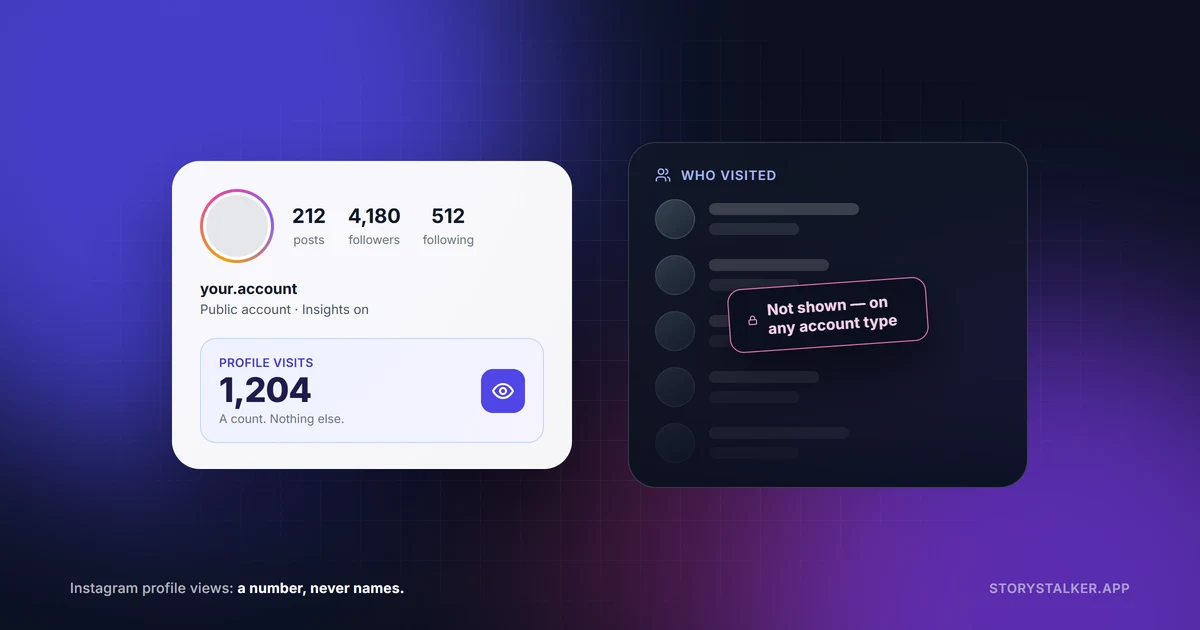
No — Instagram never shows you who looked at your profile. Not on a personal account, not on a creator or business account, and not in Instagram Plus, the $3.99-a-month tier it launched in May 2026.4 21 What Instagram does is count: any public account can now see how many actions people took on the profile after each post or story,3 14 and nothing in the app or in Meta's developer API attaches a name to that number.12 It has never told you who — not since Insights launched in 2016,64 and not on 22 September 2026.
You may also have read that Instagram is testing a 14-day profile view counter. Nothing Instagram has published says so; the sites repeating it cite each other, and we traced the story to its actual origin below.15 68 69
Jump to: Did I get caught? · Where to find your own number · What gives you away · Are the “who viewed my profile” apps safe? · The 14-day counter story, traced
Two things have changed, and they are why this question is suddenly everywhere again. Instagram Insights, once a professional-account feature,8 are now available to any public account, personal ones included.6 7 And a wave of articles has spent 2026 repeating the counter claim — PostLink says Instagram “has confirmed it's testing a feature that shows how many times your profile was viewed over the past 14 days,”15 Inspire To Thrive that “it shows a simple number: the number of times your profile was viewed over the past 14 days,”68 and IGDetective, FiveBBC, Unfollr and Views4You carry versions of the same line.69 Below is what the Help Center, the developer documentation and the changelog actually say, quoted, with the date we read them.
The short answer
| What you want to know | What Instagram gives you | Which accounts |
|---|---|---|
| Who looked at your profile | Nothing. No list, no notification, no hint.4 12 | None — personal, creator or business |
| How many times your profile was visited | A count, per post and per story, inside “Profile activity”3 10 14 | Any public account, personal or professional6 |
| Who watched your story | A username list, for 48 hours — minus subscribers to Instagram Plus (the $3.99-a-month tier) who only previewed it1 | Any account |
That is the whole picture. The rest of this article is the evidence, because “trust us” is what the profile-viewer apps say too.
Did I get caught?
If you have been on someone's profile tonight — once or ten times — this is the whole list of what could have told them.
- You tapped their story, or a highlight. The ring around their photo, or the circles under their bio. Your username goes on a list they can open for 48 hours after they posted it.1 Nothing else on that screen does this.
- You liked, commented, followed, or tagged. Each of those can send a notification, and an unliked like does not recall a push notification that already went out.49 50
- You did none of those. Then there is nothing to find. Opening the profile, the grid, the bio, the followers list, a photo — four times or forty — sends no notification, appears on no list, and adds at most one to an anonymous count.4 3
Being logged out, or on a second account, changes none of this: a public profile is served without any login at all,73 and a visit from any account is not reported to the owner. If they turned up in your search suggestions afterwards, that is your own activity shaping your own suggestions — Instagram describes recommendations as personalized to the person seeing them, and documents no mechanism that turns your visit into a suggestion of you to them.79
Where to find your own profile visits
If you want the number rather than the argument, here is where it is. Your account must be public.6
In the app
- Open your profile.
- On your profile, tap Your dashboard (personal account) or Professional dashboard (business or creator account).7
- The summary covers the last 30 days; tap See all insights for the overview (Views, Interactions, New followers, Content you shared) and the date presets — last 7, 14, 30 or 90 days, or the previous month.7 2 6
- For one post: open it and tap View Insights → Profile activity.3 For a story: open it from your Archive and swipe up.10
On instagram.com
- Select Dashboard in the left-hand menu.
- Select Insights (professional) or Your dashboard (personal), then Account or Content.6
What to do with the number. Read it as a trend, not a census — the definitions are one sentence each and say nothing about how visits are counted.14 Compare it across posts: a post that sends people to your profile is doing a job the like count does not show. And notice what happened after they arrived — in the developer version of the same metric, the count is broken down by what was tapped next (bio link, call, email, text), which is the difference between curiosity and a customer.14
The old version of this article — and eleven of the fourteen pages we read that rank for this question, including the top result72 — said personal accounts get no analytics and professional accounts get a headline “Profile visits” number. Both halves are out of date.
Who can see Insights now
The Help Center's current pages are unambiguous: “You need to have a public (personal or professional) account on Instagram to view insights.”6 The account has to be public; a private personal account gets nothing, and switching to private switches Insights off (“If you switch back to a private account, you'll lose access to insights,” with a 90-day grace period to switch back).6 So a private account owner sees no counts of any kind — not profile visits, not Views — until the account goes public.
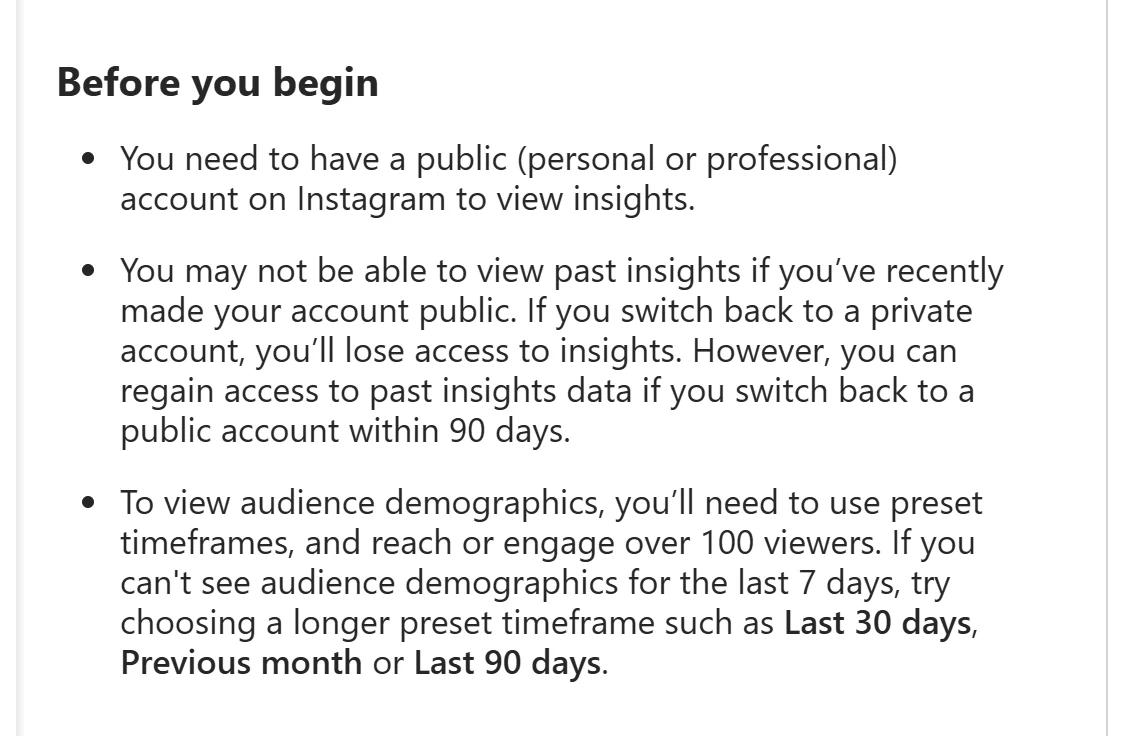
Personal accounts get their own home for this. Instagram now documents two dashboards: a Professional dashboard for business and creator accounts, and “Your dashboard” for public personal accounts, which it describes as “centralized hubs available to all public accounts.”7 In the app it is on your profile; on instagram.com it is under Dashboard in the left-hand menu.6
If you have read elsewhere that Insights are business-only, that is not carelessness on the writer's part. Several older Help Center pages still say so — one still reads “This feature is only available to business and creator accounts on the Instagram mobile app”8 and another that insights are “only available to businesses and accounts with high levels of engagement.”9 Help Center pages carry no revision dates, so we cannot prove which came last; but only the newer wording matches the dashboards the app now has, so we are going with the pages that describe them.
Where the profile-visit number actually lives
Here is the part the old article got wrong in the other direction. There is no account-level “Profile visits” figure anywhere in the current Instagram Help Center Insights pages. There was not one at the start, either: when Instagram announced business profiles and Insights on 31 May 2016,64 the Help Center's list of metrics that autumn was Impressions, Reach, Website Clicks and Follower Activity — no profile views61 — and profile views were in Insights by early 2018, shown as a seven-day bar chart.62 It had a run of six or seven years, ending with the API deprecation described further down. The About Instagram insights page describes two lists: the app's overview (Views, Interactions, New followers, Content you shared) and a fuller glossary (Views, Viewers, Interactions, Accounts engaged, Total followers, Content you shared). Neither mentions profile visits.2
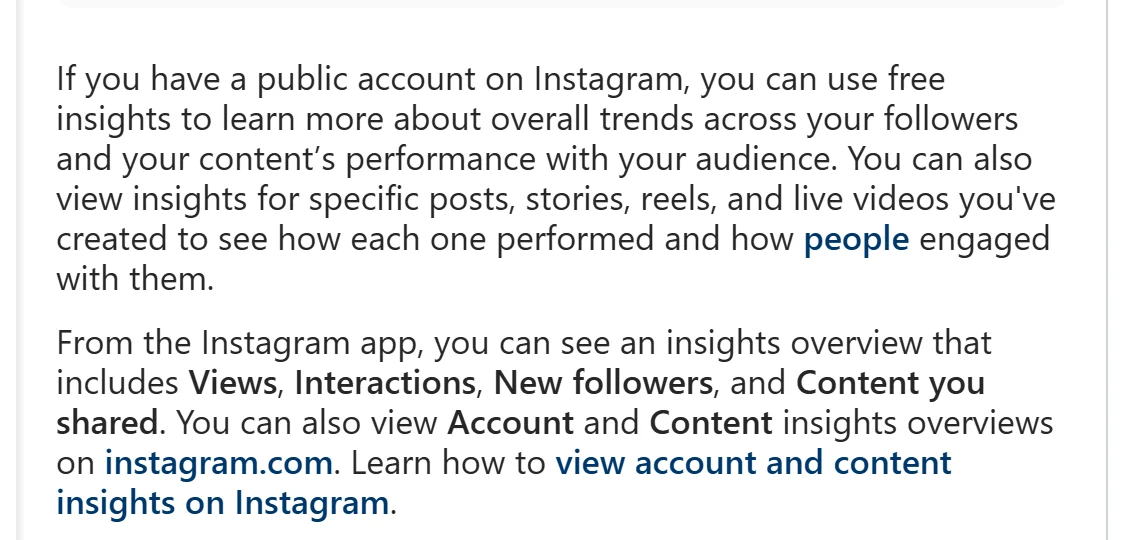
The number survives one level down, attached to content:
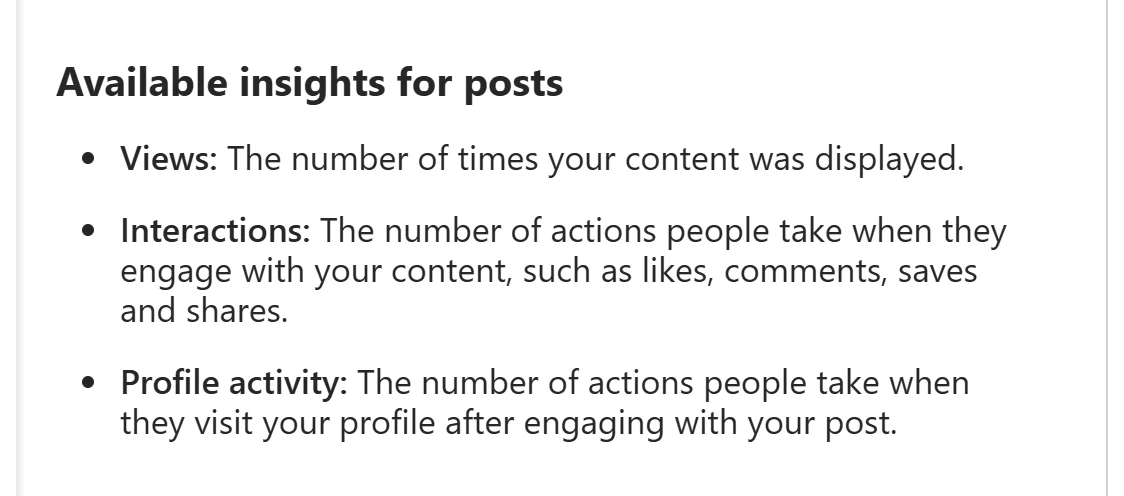
- Posts. Tap a post, tap View Insights, and you get Views, Interactions and Profile activity — “the number of actions people take when they visit your profile after engaging with your post.”3
- Stories. Story insights define Profile activity as “actions taken from your story, such as profile visits, follows, or website clicks,” and are kept for two years even though the story is gone after 24 hours.10
- Reels. The documented reel metrics are Views, Watch time, Viewers, Average watch time and Follows. No profile activity is listed for reels.11
One more place the phrase survives: Meta's Business Help Center, which documents Meta Business Suite for professional accounts, still carries a one-line definition — “Instagram Profile Visits: The number of times your Instagram profile was visited.”63 A count, again.
So the honest description of profile views in 2026 is: a per-post, per-story count of actions — profile visits among them — taken from your content, and what people did once they reached your profile. It answers “is this post sending people to my page?” It does not answer “who was that?” — and the date ranges it offers, Last 7, 14, 30, 90 days or the previous month,6 matter for a reason we will get to.
Three layers: names, numbers, nothing
It helps to stop thinking about “profile views” as one feature and sort everything Instagram tells an account owner into three layers.
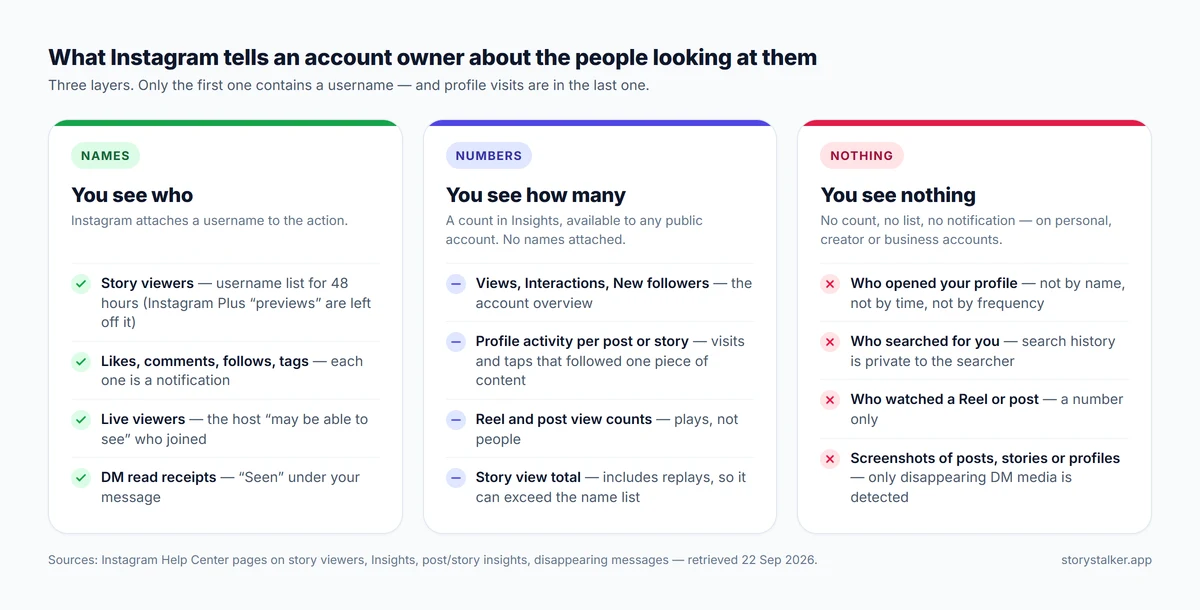
Names. Instagram attaches a username to a small set of actions. The biggest one is stories: “You'll see the number and the Instagram usernames of the people who have viewed each photo or video in your story,” and that list stays available for 48 hours after posting — a day longer than the story itself, which disappears after 24 hours70 — via the Archive.1 Likes, comments, follows, tags and mentions can each trigger a notification.50 Joining a Live may be visible to the host and the other viewers.53 Read receipts, unless you turn them off, show when you have seen a direct message.52
Numbers. This is where Insights live. The account overview is four counts — “Views, Interactions, New followers, and Content you shared”2 — and per-post insights add a fifth called Profile activity, which the Help Center defines as “the number of actions people take when they visit your profile after engaging with your post.”3 They are totals. No account-level or post-level metric can be tapped to reveal a person; the one screen that does list names is the story viewer list, which is not an Insights metric.1
Nothing. Who opened your profile from search, from a tag, from a friend's followers list, from a link in a group chat: no list, no notification, and no count beyond the per-post and per-story totals above. The Help Center has no article on it at all.4 Searching it for “who viewed my profile” returns story-viewer and privacy articles, and the only sentence on the site that addresses the question comes from the Meta AI assistant at the top of the results page — an AI-generated answer, not a policy page, but it says: “Instagram does not provide a way to see who has viewed your profile.”4 Screenshots belong in this layer too: the only screenshot detection Instagram documents is for disappearing content in chats — disappearing photos and videos get a dotted-circle marker, and vanish-mode and timed disappearing messages trigger a notification.5 55 71 The Help Center documents no screenshot detection for posts, stories or profiles.1 5
One asymmetry is worth underlining because it is where most people get caught. Everything on a profile — grid, bio, tagged tab, follower list, and highlights whose story is more than 48 hours old — sits in the “nothing” layer. The story ring at the top of the same screen sits in the “names” layer. A single tap moves you from invisible to listed, which is why our guide to viewing stories anonymously exists and this one does not need a matching guide for profiles.
What actually reveals that you looked
Since nothing about a profile visit is reported, the practical question is what does get reported. Here is the list, in the order people usually trip over it.
| Action | What the other person sees | Source |
|---|---|---|
| Opening a profile, grid, bio, tagged tab, follower list | Nothing | No Help Center feature; Insights are counts only 2 |
| Watching a story | Your username in the viewer list, for 48 hours after it was posted | 1 |
| Watching a highlight | Nothing documented. The viewer list covers the 48 hours after the original story was posted; no Help Center page says whether a highlight view is attributed to you after that | 1 |
| Liking, then unliking | The activity entry disappears, but “the person who posted it will still get a push notification if they have notifications turned on” | 49 |
| Following, then unfollowing | A follow notification; “People won't be notified when you unfollow them” | 50 51 |
| Commenting, tagging, mentioning | A notification — Instagram says you “can receive” one, and describes the mention trigger for accounts you follow | 50 |
| Watching a Reel or feed video | A count | 11 |
| Reading a DM | A read receipt showing you have viewed their message, unless you turn read receipts off | 52 |
| Screenshotting a post, story or profile | Nothing documented; the only screenshot detection the Help Center describes is for disappearing chat media and messages | 5 55 71 |
| Screenshotting a disappearing photo or video in a chat | A dotted-circle marker next to the message | 5 |
| Joining a Live | The host “and anyone else who's viewing may be able to see that you've joined” | 53 |
| Reading someone's Note | Nothing documented; the Help Center says only likes and replies are visible to the owner (“Only you can see who's liked or replied to your note”) | 66 |
| Searching for someone | Nothing; the Help Center describes search history only as your own record, which you can clear | 54 |
| Screenshotting a vanish-mode message | A notification, if the screenshot is detected | 55 |
Two of those deserve a note.
The like you take back. This is one of the few things the Help Center addresses directly: “Very soon after you remove a like, the like alert will disappear from other people's Activity. If you've accidentally liked a photo and then unliked it, the person who posted it will still get a push notification if they have notifications turned on.”49 There is no window in which unliking is guaranteed to erase it. Note too that the poster always sees your like, even if you use the newer setting that hides your likes from everyone else.56
The story tap. A profile and its story ring are one screen apart, and the ring is the only thing on that screen you can merely look at that reports you. Instagram now sells a way around this — Instagram Plus subscribers can “preview a story without showing up as a viewer”21 — and the Help Center confirms that those previews are left off the viewer list.1 For public accounts, the older approach still works: our story viewer fetches public stories without logging in to any account, so there is no account for the view to be attributed to. Neither approach touches private accounts, whose content Instagram shows only to approved followers.73
If you want to browse without leaving a trace, the short list is: do not tap story rings or highlights (or use our story viewer for public accounts, or Instagram Plus's preview21); do not like, comment, follow or tag; turn off read receipts if you will be messaging them;52 and turn off Activity Status if you would rather they not see when you were last online.80 Everything else — the profile, the grid, the followers list, search — leaves nothing behind.
The “Instagram is testing a 14-day profile view counter” story, traced
Search this question in 2026 and you will find near-identical paragraphs on around ten sites: Instagram has “confirmed” it is testing a feature that shows “how many times your profile was viewed over the past 14 days,” in “limited testing since late 2025,” rolling out through 2026, no names attached.15 68 69 Some add a quote from Adam Mosseri, the head of Instagram, from a “July 2026 Q&A.”74 69
We tried to find the source. This is what an afternoon of following links produced.
- The earliest version we could find is a PostLink post first published 30 March 2026 — originally titled “Is Instagram Adding Profile Views in 2026? (Official Answer)”, since retitled and revised on 8 September 2026. It names no source — no Help Center page, no Mosseri post, no press report.15 Later articles cite each other (IGDetective credits Kontentino for the Mosseri line69), a Reddit thread,68 or nothing.
- The Mosseri quote (“we want people to feel comfortable just browsing Instagram…”) appears only on marketing blogs. We could not find it on his Threads or Instagram accounts, and the blog that introduced it, Kontentino, links to his profile page rather than to a post.74 One of the sites repeating the claim says as much in its own sources note: “treat the Mosseri quote and the 14-day test as secondary-sourced until a primary transcript or a recognized tech-press write-up can be linked here.”69
- A search of TechCrunch, Engadget, Social Media Today, 9to5Mac, Android Authority, Android Police and PhoneArena for an Instagram profile-views test returned no 2025–2026 coverage. The only related story is from 2015.16
- Instagram's own @creators account announced an Insights redesign on 24 April 2026 — “Your most important metrics are now front and center and new ones, such as engagement rates” — with no mention of profile views.17
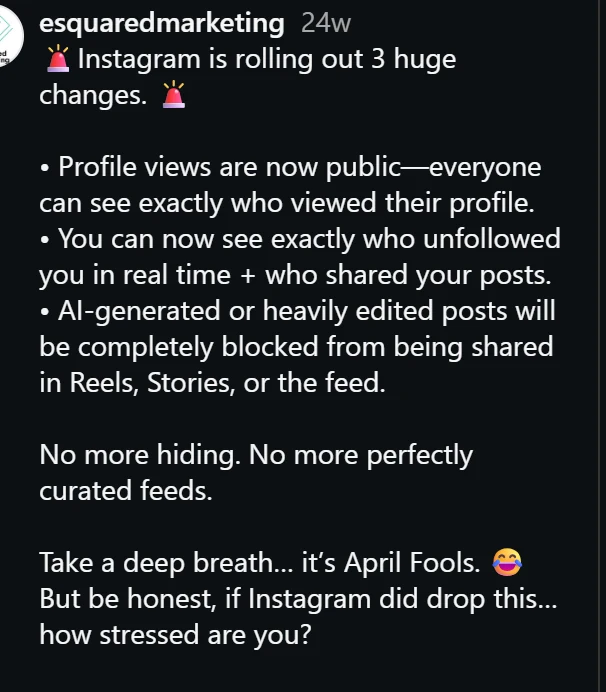
- The second result Google showed us on 22 September 2026 for “does instagram have profile views” was an Instagram post whose first bullet reads “Profile views are now public—everyone can see exactly who viewed their profile.” It is dated 1 April 2026, and four lines later: “Take a deep breath… it's April Fools.”18 In the snippet we saw that day, only the opening lines were shown.
What we think happened is that three real things got blended into one fake one:
Threads, not Instagram. In late March 2026 Meta's Threads app started showing a “recent views” number on profiles — the number of times the account's posts were viewed over the trailing 30 days,27 shown next to the follower count once an account passes 10,000 views, with a switch to turn it off in profile settings.19 It also has a shareable 30-day views card.20 That is a count of post views, on a different app, but “Meta is showing view counts on profiles” is close enough to “Instagram shows profile views” to survive a rewrite.
The Insights date preset. Instagram Insights offer Last 7 days, Last 14 days, Last 30 days, Previous month and Last 90 days.6 “Past 14 days” is a filter you can apply to any Insights metric. It is not a feature.
The number on your own profile. This is the one we think actually started it. When Instagram opened Insights to public personal accounts — the Help Center gives no date; its current pages simply describe it6 7 — it also put a dashboard entry on the profile screen with what the Help Center calls “a summary of your performance over the last 30 days.”7 Its headline figure is Views — “the number of times your content was played or displayed.”2 People saw a number next to their bio and read it as profile views. On Reddit in July 2025: “instagram has a new feature that tells you how many views you get in a month right by where your bio is… I have only 341 followers but my profile viewer count keeps rapidly increasing and right now is at 73k.”57 In August: “My profile says I have got 14.4K views on my profile in the last 30 days but it's just my normal instagram account and normal post views.”58 In September: “Is Instagram adding profile views?”59 Seventy-three thousand profile visits on a 341-follower account is implausible; seventy-three thousand Reel plays is routine. By the following spring, articles had turned that wave into a “confirmed test” with a 14-day window.
None of this is new, either. A 2024 version of the same rumor went around X and TikTok in late August of that year; Dexerto looked for an announcement and reported that “Instagram is not adding a profile views feature.”60 The cycle seems to run about once a year.
Our verdict, as of 22 September 2026: the 14-day profile view counter is unverified, and everything we can check points to it being a rumor. What would change our mind is a Help Center page or a post from @instagram, @creators or @mosseri describing it. If one appears, we will update this article and say so at the top.
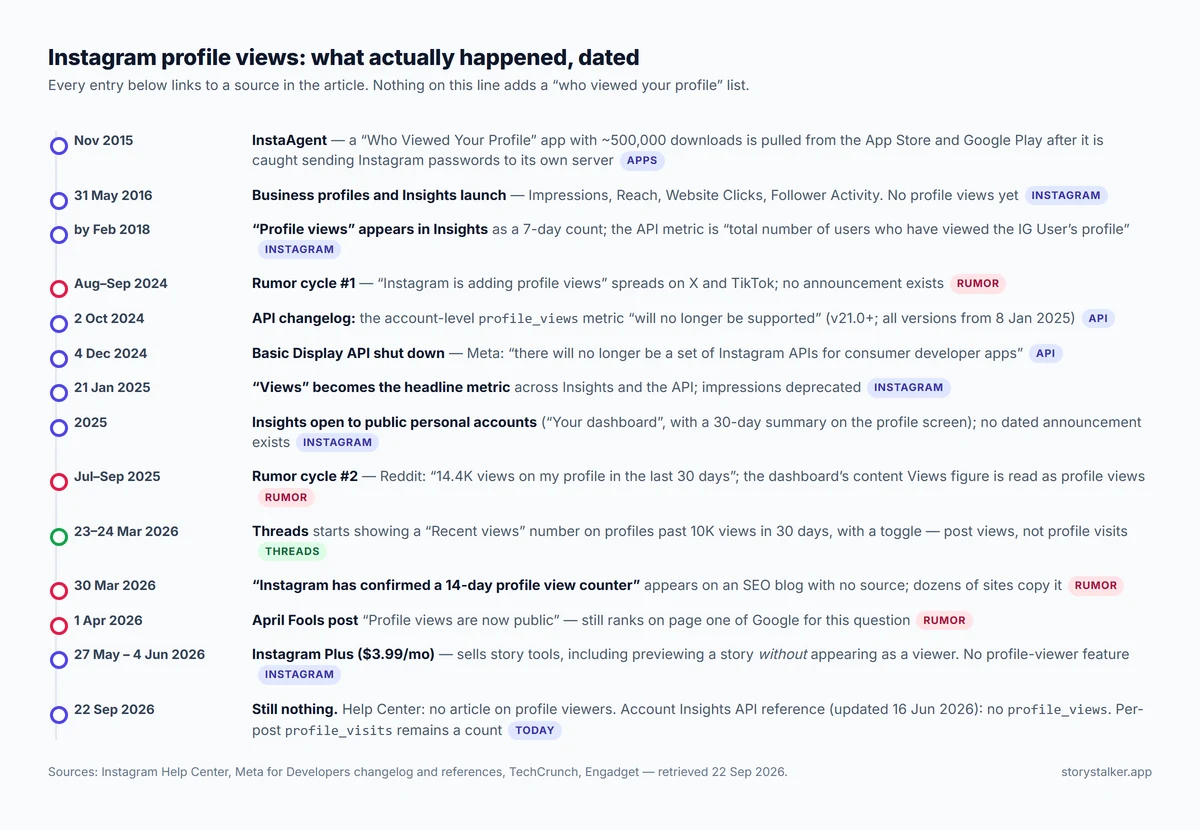
There is one more piece of evidence about direction, and it points the same way. On 27 May 2026 Meta launched Instagram Plus, a $3.99-a-month subscription it had been testing in Mexico, Japan and the Philippines since March,21 75 and Instagram's own announcement post, dated 4 June, says it is “rolling out globally starting today.”48 Its story features let subscribers “see how many people have rewatched your Story in aggregate,” “search their story viewer list to see who is watching,” and “preview a story without showing up as a viewer.”21 The Help Center now notes that the story viewer list “do[es] not include the usernames of Instagram Plus subscribers who have previewed your story.”1 No profile-viewer feature is in the paid tier either; we come back to what that suggests below.
What the developer API proves
The short version, for anyone who does not want to read API documentation: every number a program can pull from Instagram about an account is a total, and none of them names a visitor. That is why no app can do what the “who viewed my profile” apps claim, and the next section is about those. The detail follows for the record.
Help Center pages are written for people. The developer documentation is written for programs, and it is the more useful source here, because every tool that plays by Instagram's rules is limited to what these endpoints return — and the ones that don't can see no more than a logged-in user sees.23 26
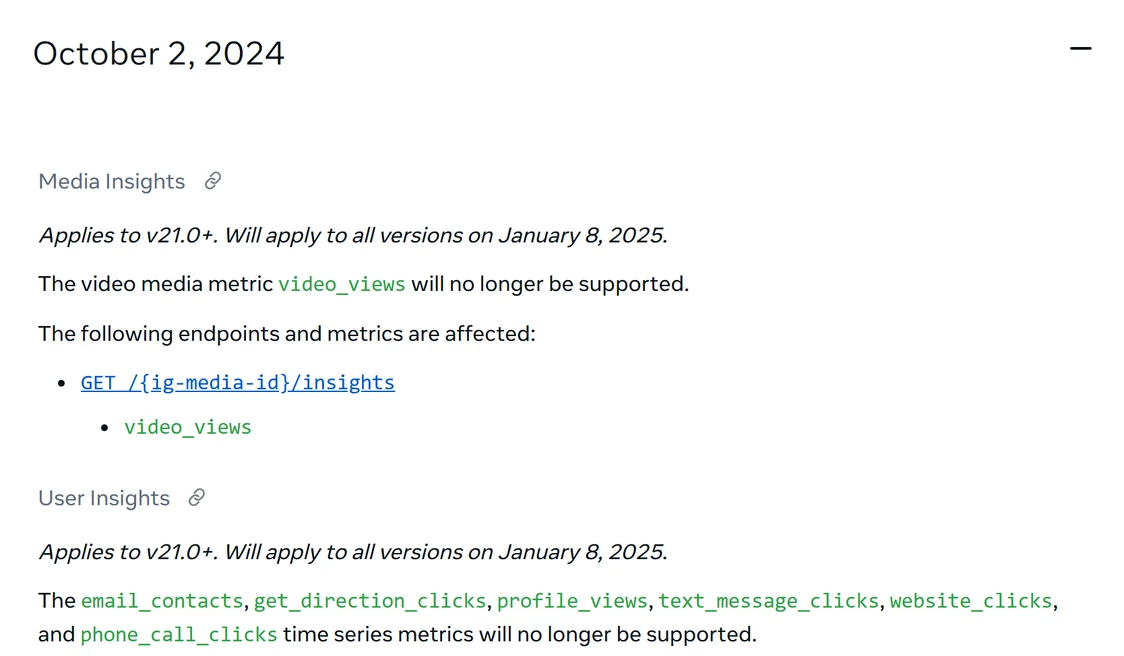
We read both references on 22 September 2026. The account-level Instagram Account Insights reference, updated 16 June 2026, lists every metric an app can request about a business or creator account: accounts_engaged, comments, engaged_audience_demographics, follows_and_unfollows, follower_demographics, likes, profile_links_taps, reach, replies, reposts, saves, shares, total_interactions and views, plus a deprecated impressions.12 There is no profile_views in that table. There used to be. The platform changelog entry for 2 October 2024 reads: “The email_contacts, get_direction_clicks, profile_views, text_message_clicks, website_clicks, and phone_call_clicks time series metrics will no longer be supported,” from API v21.0 and for all versions from 8 January 2025.13
The per-post Instagram Media Insights reference, updated 11 September 2026, still carries two relevant metrics for posts and stories: profile_visits (“The number of times your profile was visited”) and profile_activity (“The number of actions people take when they visit your profile after engaging with your post”), the latter with a breakdown of what was tapped — BIO_LINK_CLICKED, CALL, DIRECTION, EMAIL, OTHER, TEXT.14
Three things follow from that, and they are the technical backbone of everything else in this article:
- The count is real and the list is not. Every metric on both endpoints is an integer or a demographic bucket. Demographics are not returned at all below 100 followers or engagements.12 That floor keeps small numbers from being reverse-engineered into individuals.
- Only the account owner can ask. Insights require an access token from the account holder (or someone given a role on its connected Facebook Page) plus an insights permission —
instagram_manage_insightswith Facebook Login,instagram_business_manage_insightswith Instagram Login — so no app can request insights about an account that did not authorize it.12 - The consumer API is gone. The Instagram Basic Display API — the only Instagram API that served ordinary, non-professional accounts24 — was shut down on 4 December 2024; “All requests to the Instagram Basic Display API will return an error message.”13 It only ever exposed four fields about the logged-in user anyway: account type, ID, media count and username.38
If an app on your phone claims to know who viewed your profile, it is not getting that from Instagram, because Instagram has nowhere to get it from.
The “who viewed my profile” apps
Search either app store for “who viewed my Instagram profile” and you will find pages of results. We read through the listings and the one-star reviews so you do not have to; the concrete examples are below. First, the mechanics, because they explain every review.
Where the data would have to come from. An app can learn about your Instagram account in exactly two ways: through Meta's API with your permission, or by logging in as you. The API route is closed for this purpose — the only endpoints that return audience data are the professional-account Insights endpoints described in the previous section; they require the account owner's own token, and every metric they return is an aggregate count, none carrying a viewer identity.12 Meta shut down the consumer-facing Basic Display API on 4 December 2024 and said so plainly: “After December 4th, 2024, there will no longer be a set of Instagram APIs for consumer developer apps.”24 That leaves the login route, which is the one that gets people hurt.
What they actually do. Three patterns cover the market:
- Follower analytics with a new label. The app logs in with your credentials (or scrapes your public follower list), compares snapshots, and reports who unfollowed you, who does not follow back, who likes your posts most. That data is real. The “profile viewers” tab is the same list of engaged followers under a different heading, sometimes with random accounts mixed in.
- The paywalled reveal. A loading animation, a message that it has found some number of people who viewed your profile, and a weekly subscription — often presented as a free trial — to see them. What is behind the paywall is pattern 1, or nothing.
- Credential harvesting. The oldest and worst. In November 2015 an app called “Who Viewed Your Profile — InstaAgent,” downloaded roughly half a million times, was found to be reading users' Instagram usernames and passwords and “sending the unencrypted passwords to a remote server,” then posting images to their accounts without permission; it disappeared from both stores within a day, and similar apps stayed up.16 65
What Instagram says about them. The Help Center's page on apps that offer likes and followers says it plainly: “None of these services are affiliated with or endorsed by Instagram… If you give these apps your login information, whether with an access token or by giving them your username and password, they can gain complete access to your account.”25 Handing your password to an app is also one of the triggers Instagram names for restricting an account for automated data collection.26 And Meta's rules for developers — “Don't confuse, deceive, defraud, mislead, spam or surprise anyone”22 — mean a genuine profile-viewer app could not be approved even if the data existed.
What the listings say, in their own words. We opened eight listings on 22 September 2026 — five on the App Store, three on Google Play — and read the reviews. Most are worth quoting because they make the case better than we can.
- One iOS app, InStalker Visitors Tracker IG, says this in its own description: “Instagram does not hand out a list of who opened your profile, to us or to anyone else.” The same listing sells an in-app purchase named “See Who Viewed Your Instagram” for $3.99.39
- Another, Who Profile: View for my Insta, requires you to “use your login to sign in to the account” and sells a Weekly Pro subscription at $6.99, Monthly at $13.99 and Yearly at $79.99. A reviewer: “you can't see who is viewing your page nothing this is a lie.” Another says they were charged before the advertised trial ended.40
- Profile Reports Tracker sells a $7.99 weekly subscription and a $12.99 monthly one that starts with a 7-day free trial; a reviewer reports it “locking me into trying to pay for a subscription” with “no way to exit from the subscription page.”41
- Who Interacts With My Profile+ charges $6.99 a month or $44.99 a year, plus a $2.49 in-app purchase labelled “Free Trial”; a reviewer: “It doesn't show you anything good besides what you already know about your profile.”76 FollowPeek: Who Viewed Profile, by contrast, says it never asks for your password and analyzes public profiles — and sells “Pro” tiers at $4.99, $14.99 and $49.99 anyway.77
- On Google Play, Profile Viewers for Instagram lists 500,000+ downloads and a 4.0 rating. From its reviews: “It just takes random people from your followers list and say they viewed your profile. How is someone who passed away 3 years ago my stalker?”42 A second Play app with a near-identical description, Profile Visitors for Instagram, carries a Data safety card reading “Data isn't encrypted” and “Data can't be deleted,” and a review that says “Within hours I was blocked by Instagram, account suspended.”43
- The most-reviewed of the Play apps we opened, Who viewed my profile (41,000 reviews, 500,000+ downloads), is unusually honest about the method: “We analyze signals you can legally access to estimate profile viewers (likes & comments)…” Its reviewers describe the result — “it's only showing the people that have followed you, not people that have simply looked at your profile.”44

Two of the apps that Google still indexes for these searches — “Who Viewed - my Insta Profile” on the App Store and “Instegro Who Viewed My Profile” on Google Play — returned “page not found” when we opened them.78 Removals happen quietly, and new listings with near-identical descriptions take their place: two of the Play apps above share their description text almost word for word.42 43
Where Meta has actually gone after this. We found no Meta lawsuit naming a “profile viewer” app. What Meta has done is sue the layer underneath them: the scraping and clone-site operators that harvest Instagram profiles at scale. In November 2020 it sued the operator of a network of Instagram clone sites that had scraped “more than 100,000 Instagram accounts”;45 in July 2022 it sued an individual who scraped “over 350,000 Instagram users” and a company, Octopus, whose customers “self-compromised their Facebook and Instagram accounts by providing their authentication information” so the software could scrape their followers and engagement — the exact mechanic a password-based viewer app uses.46 Facebook's Help Center, unlike Instagram's, says it outright: “Third-party apps also can't provide this functionality. If you come across an app that claims to offer this ability, please report the app.”28
If you already installed one. Change your Instagram password, then remove the app's access under Profile → Menu → Website permissions → Apps and websites → Active → Remove. If the app took your password directly rather than using Instagram's login, it will not appear there, and the password change is what cuts it off. Instagram notes that a removed app “may have stored information from when you were using it”; removal stops future access, not what was already taken.47
How to tell in ten seconds. The red flags, in the order you will meet them:
- It asks for your Instagram password. Meta's API does not offer viewer data, so a legitimate app would have nothing to do with your password; one that wants it is collecting it.25
- It shows blurred “viewers” before you pay. That is a loading screen, not a database.
- The subscription is weekly. $3.99–$7.99 a week is $200–$400 a year for a list of your own followers.40 41
- The reviews say “it just showed my followers” or “charged me and showed nothing.” They are describing the product accurately.42 44
If your teenager wants to install one: none of them can deliver what they promise, and the ones that ask for a password put the account at risk. The reviews above are the useful thing to show them — the dead relative listed as a “stalker” usually lands.
How other platforms handle it
“No platform shows profile viewers” is a line you will see in articles on this topic — our own old version said it — and it is wrong in two places. Here is what each platform's own help documentation says, so the comparison is on the record rather than from memory.
| Platform | Can you see who viewed your profile? | What you get instead | Source |
|---|---|---|---|
| No | Counts: Views, Interactions, per-post Profile activity; story viewer list only | 2 3 1 | |
| Threads | No | Per-post “Profile visits” count; a “Profile views” label that is actually the share of post views seen on your profile page; a public “recent views” number on some profiles | 27 19 |
| No — “Facebook doesn't let people track who views their profile. Third-party apps also can't provide this functionality.” | — | 28 | |
| TikTok | Yes, opt-in and mutual. Profile view history shows accounts that viewed you in the past 30 days, only if they also have it on; off by default; 16+ and under 5,000 followers | Also an opt-in Post view history (7 days) | 29 30 |
| Yes, with limits. Free accounts see the three most recent viewers from the last 90 days; Premium sees the full list for up to 365 days. Private-mode viewers appear only as “LinkedIn Member” | Viewer trends and filters on Premium | 31 32 | |
| Snapchat | No | Story viewers by name, up to 200, then a count; Snapchat+ shows how many friends rewatched, not who | 33 34 |
| X | No documented list | Aggregate “User profile clicks” in post analytics | 35 |
| YouTube | No | Estimated audience analytics, including signed-out traffic | 36 |
| No | Per-Pin “Profile visits: The number of people who visited your profile after viewing your Pin” | 37 |
Two things stand out. The two platforms that do show profile viewers both give the viewer a way out: TikTok exposes only people who opted in, and LinkedIn shows viewers by name by default but lets anyone switch to private mode — free users at the cost of their own viewer list, Premium subscribers without that cost.29 32 Neither exposes someone who has chosen not to be seen. And the Threads row is worth reading twice, because it may be part of where the “Instagram now shows profile views” chatter comes from — Threads Insights genuinely contain a metric labelled “Profile views,” which its Help Center defines as the percentage of a post's views that happened on your profile page.27 It is a traffic-source split, not a visitor count, on a different app.
Why Instagram keeps it this way
We could find no Instagram policy statement on why it does not show profile viewers — the Help Center has no article on the subject at all4 — so what follows is our reading of the evidence, not a quote.
The clearest signal is what Meta chose to sell in 2026. Instagram Plus charges for tools that make the viewer less visible — previewing a story without appearing on the list — and, on the poster's side, for an aggregate rewatch count and a search box for the viewer list you already had.21 A product team that thought people wanted to be seen looking would have built the opposite feature. Meta's other app, Threads, did add a number to profiles this year, and even there it is a single aggregate views figure — Gamble's own follow-up calls it recent post views — not a list of who looked; it only appears once an account passes 10,000 views in a 30-day window, and it can be switched off.19
The second signal is the developer platform. Meta's rules for apps say “Don't confuse, deceive, defraud, mislead, spam or surprise anyone,” and warn that “apps with minimal utility that provide predictions, assessments, or similar outputs to the user, may not be allowed.”22 Its Platform Terms prohibit using platform data to build profiles of people without consent or to provide “tools for surveillance.”23 A profile-viewer list is surveillance in the everyday sense (the Terms' own gloss is aimed at law-enforcement and national-security uses), and it would still be strange for Meta to ban third parties from approximating one and then ship it.
The third is just product logic. People open a lot of profiles they have no intention of interacting with — someone tagged in a friend's photo, a recommended account, whoever commented on a post. If each of those visits were reported by name, people would open fewer of them, and browsing is what Meta sells ads against. Every major platform except LinkedIn and TikTok's opt-in feature has landed in the same place, as the comparison above shows.
Frequently Asked Questions
Does looking at someone's profile a lot make Instagram suggest me to them?
Nothing Instagram documents works that way. Its recommendations page describes suggestions as personalized to the person seeing them — “if you interact with restaurants and bookstores on Instagram, we may recommend content about food, recipes, books, or reading” — and says nothing about a viewed account being shown your profile.79 If someone you looked at starts appearing in your search bar or suggestions, that is your activity shaping your suggestions, not a signal sent to them.
Does it matter if I look while logged out, or from a second account?
Not for what they can see. A public profile is visible to anyone without an Instagram account at all,73 and no visit — from any account or from none — is reported to the owner. The only things that carry a name are the ones in the list above: a story view, a like, a comment, a follow, a tag, a read receipt.
Is Instagram adding a profile views feature?
Not that anyone can show. The “14-day profile view counter” story that spread through 2026 has no Help Center page, no Instagram or Mosseri post and no press report behind it; the sites repeating it cite each other or nothing.15 69 What is real: Threads shows a “recent views” post-view count on some profiles,19 Instagram Insights have a 14-day date preset,6 and Insights — with a 30-day Views figure on the profile screen — are now available to public personal accounts.7 We will update this article if Instagram documents anything new.
Can someone see if you viewed their highlights?
Only within the window that applies to the original story. Instagram says you can see who viewed a story for up to 48 hours after posting;1 a highlight is that same story kept on the profile, and the Help Center describes no viewer list beyond the 48 hours. So a highlight whose story is older than 48 hours cannot show the owner your username, as far as anything Instagram documents.
Are “who viewed my Instagram profile” apps safe?
No, and they cannot work. Meta's API does not expose viewer identities12 and its consumer API was shut down in December 2024,13 so an app has nothing to query. Apps that ask for your Instagram password are collecting it; Instagram warns that any app you hand your login to “can gain complete access to your account,”25 and giving your password to a third-party app is a listed reason for account restriction.26 Apps that show blurred “viewers” behind a weekly subscription are, by their own descriptions, guessing from your likes and comments — showing you people who already interact with you.39 44
Can I see who viewed my Reel?
You see a view count, and so does everyone else: “Anyone can see view counts on your Reels tab,” while the counts on your grid are visible only to you and require a professional account.67 Reel insights are Views, Watch time, Viewers, Average watch time and Follows — all numbers.11 There is no viewer list for Reels, feed posts or profiles; stories are the only content type with a viewer list you can check afterwards (a Live shows the host who joins, in real time53). We cover the details in can you tell who viewed your Instagram Reel?.
Does the profile visit count include me looking at my own profile?
Instagram does not publish how the count is computed, so any confident answer you read elsewhere is a guess. The metric definitions are one sentence each — “the number of times your profile was visited”14 63 and “actions people take when they visit your profile after engaging with your post”3 — with no exclusion listed. Treat it as a rough signal, not a census.
Sources
All pages were opened and read on 22 September 2026. Help Center pages carry no visible revision date; developer pages show the “Updated” date given.
- Instagram Help Center, How to tell who's seen your Instagram story — viewer usernames, the 48-hour window, replays, and the note that Instagram Plus previews are excluded from the list.
- Instagram Help Center, About Instagram insights — Insights for public accounts; the overview and metric glossary.
- Instagram Help Center, View insights on your Instagram posts — the “Profile activity” definition for posts.
- Instagram Help Center search for “who viewed my profile” — no article on the topic exists; the quoted line is from the Meta AI support assistant shown above the results, not from a policy page.
- Instagram Help Center, See the status of a disappearing photo or video you've sent on Instagram — the only documented screenshot detection (“If we detect someone has taken a screenshot of your photo or video, you'll see a dotted circle next to it”).
- Instagram Help Center, View account and content insights on Instagram — “public (personal or professional) account,” the private-account caveat, date ranges and the instagram.com Dashboard path.
- Instagram Help Center, About Instagram dashboards — “Your dashboard” for personal accounts and Professional dashboard for professional accounts.
- Instagram Help Center, Select a date range for your account insights on Instagram — an older page that still says Insights are business- and creator-only.
- Instagram Help Center, See insights for your Instagram account — another older page with the business-only wording.
- Instagram Help Center, View insights on your Instagram Stories — “Profile activity: Actions taken from your story, such as profile visits, follows, or website clicks”; two-year retention.
- Instagram Help Center, View insights on your Instagram reels — the reel metric list.
- Meta for Developers, Instagram Account Insights — updated 16 June 2026; the full metric table, permissions and limitations.
- Meta for Developers, Instagram Platform changelog — entries for 2 October 2024 (profile_views deprecation), 4 December 2024 (Basic Display shutdown) and 21 January 2025 (views metric).
- Meta for Developers, Instagram Media Insights — updated 11 September 2026; profile_visits and profile_activity.
- PostLink, Does Instagram Notify When You View a Profile? (2026) — first published 30 March 2026 under the title “Is Instagram Adding Profile Views in 2026? (Official Answer)”, retitled and revised 8 September 2026; the earliest dated instance of the “14-day” claim we found; cites no source.
- Engadget, Instagram profile tracking app harvests your usernames and passwords — 10 November 2015.
- Instagram, @creators post of 24 April 2026 announcing the redesigned Insights.
- Instagram, @esquaredmarketing post of 1 April 2026 — the April Fools post that ranks for this query.
- Lindsey Gamble, Threads is starting to publicly display recent views — 23 March 2026; and the accompanying Threads post. Observational reporting; we found no Meta announcement.
- Matt Navarra, Threads post of 20 April 2026 showing the shareable 30-day views card.
- TechCrunch, Meta officially launches Instagram, Facebook and WhatsApp subscriptions — Sarah Perez, 27 May 2026.
- Meta for Developers, Developer Policies.
- Meta for Developers, Platform Terms — prohibited practices.
- Meta for Developers blog, Update on Instagram Basic Display API — 4 September 2024.
- Instagram Help Center, Why you should not use apps that offer likes and followers on Instagram.
- Instagram Help Center, Why your account has been restricted for data scraping and what can you do — names giving your username and password to a third-party app as a trigger.
- Instagram Help Center (Threads), View insights on Threads — per-post “Profile visits” and the “Top sources of views” breakdown that includes a “Profile views” percentage.
- Facebook Help Center, Who views your Facebook profile — “Facebook doesn't let people track who views their profile. Third-party apps also can't provide this functionality.”
- TikTok Support, Profile view history — 30-day, mutual, opt-in; 16+ and fewer than 5,000 followers.
- TikTok Support, Post view history.
- LinkedIn Help, Who's Viewed Your Profile — differences between Basic and Premium.
- LinkedIn Help, Private mode and semi-private mode.
- Snapchat Support, How can I see who viewed My Story?.
- Snapchat Support, How does the Rewatch Indicator work?.
- X Business Help, Post activity dashboard — “User profile clicks” definition.
- YouTube Help, Audience tab in YouTube Analytics and Unique viewers.
- Pinterest Help, Pin stats.
- Meta for Developers, Instagram Basic Display API — User reference — archived 22 August 2024, before the shutdown.
- App Store, InStalker Visitors Tracker IG — description and In-App Purchases list.
- App Store, Who Profile: View for my Insta — description, In-App Purchases and Ratings & Reviews.
- App Store, Profile Reports Tracker — In-App Purchases and reviews.
- Google Play, Profile Viewers for Instagram — listing and reviews.
- Google Play, Profile Visitors for Instagram — Data safety card and reviews.
- Google Play, Who viewed my profile — “About this app” and reviews.
- Meta Newsroom, Combating Clone Sites — 19 November 2020.
- Meta Newsroom, Taking Action Against Scraping for Hire — 5 July 2022.
- Instagram Help Center, Manage the privacy settings for apps and websites that you've logged into or connected on Instagram.
- Instagram, Introducing Instagram Plus: More of What You Love — 4 June 2026: “Story Preview – Preview stories without the pressure to react… Instagram Plus is rolling out globally starting today.”
- Instagram Help Center, Like or unlike a post on Instagram.
- Instagram Help Center, How notifications work on Instagram.
- Instagram Help Center, Unfollow someone on Instagram — “People won't be notified when you unfollow them.”
- Instagram Help Center, Manage read receipts for your chats on Instagram.
- Instagram Help Center, View someone's live broadcast on Instagram.
- Instagram Help Center, See your recent searches on Instagram.
- Instagram Help Center, Send messages in vanish mode on Instagram — “You'll receive a notification if we detect they take a screenshot.”
- Instagram Help Center, Manage who can see your likes on content on Instagram — “Regardless of your setting choice, the account that posted the content you liked can see that you liked their post or reel.”
- Reddit, r/instagramLab, Instagram profile views — 18 July 2025.
- Reddit, r/Instagram, Why does my instagram have so many profile views — 19 August 2025.
- Reddit, r/Instagram, Is Instagram adding profile views? — 3 September 2025.
- Dexerto, Is Instagram adding profile views in 2024? — Kawter Abed, 8 September 2024.
- Instagram Help Center, Which insights can I view on Instagram? — as archived 17 September 2016: Impressions, Reach, Website Clicks, Follower Activity; no profile views.
- Social Media Examiner, 4 Ways to Use Instagram Insights to Improve Your Marketing — Victoria Wright, 21 February 2018: “bar graphs that reveal the total impressions, reach, and profile views for the past 7 days.”
- Meta Business Help Center, Instagram Profile Visits — “The number of times your Instagram profile was visited.”
- Instagram Business blog, Coming Soon: New Instagram Business Tools — 31 May 2016, as archived.
- Computerworld, Google, Apple axed InstaAgent after app stole passwords, hijacked Instagram accounts — Darlene Storm, 11 November 2015.
- Instagram Help Center, Share a note with others on Instagram.
- Instagram Help Center, Show or hide view counts on your Instagram profile — “only you can see how many views your posts and reels get on your grid. Anyone can see view counts on your Reels tab.”
- Inspire To Thrive, Can You See Who Views Your Instagram Profile? 7 Real Ways — 16 August 2026; cites no Meta source for the “test.”
- IGDetective, Does Instagram Have Profile Views? What Others Can See (2026) — 28 August 2026, updated 14 September 2026; repeats the 14-day claim and, in its sources note, concedes it is “secondary-sourced.”
- Instagram Help Center, How long Instagram stories remain visible — “Photos and videos you share to your story disappear from Feed, your profile and Direct after 24 hours, unless you add it as a highlight.”
- Instagram Help Center, About disappearing messages in Instagram chats — “You'll receive a notification if we detect they take a screenshot.”
- Outfy, Can People See Who Viewed Their Instagram Profile? — the top-ranking page for these queries on 22 September 2026 (updated 16 September 2026): “Business and creator accounts only get total profile visit numbers through Insights.” We counted eleven of fourteen ranking pages making the same business-only claim.
- Instagram Help Center, Differences between public and private accounts on Instagram.
- Kontentino, Can you see who views your Instagram profile? — 17 August 2026; attributes the quote to “a July 2026 Q&A” and links only to instagram.com/mosseri.
- TechCrunch, Meta starts testing a premium subscription on Instagram — 30 March 2026.
- App Store, Who Interacts With My Profile+ — In-App Purchases and reviews.
- App Store, FollowPeek: Who Viewed Profile — description and In-App Purchases.
- App Store, Who Viewed - my Insta Profile — returned “The page you're looking for can't be found” on 22 September 2026; the Google Play listing for “Instegro Who Viewed My Profile” returned “Not Found” the same day.
- Instagram Help Center, Recommendations on Instagram — recommendations are “personalized … unique recommendations for each person.”
- Instagram Help Center, Turn your Instagram Activity Status on or off — “people you follow and anyone you message will see when you were last active or currently active.”
The StoryStalker editorial team
We build and maintain a set of browser tools for viewing and saving public Instagram content, which means we spend an unreasonable amount of time reading Instagram's help pages, watching features change, and testing what actually happens on a real device versus what the documentation claims. These guides are written from that work. Where Instagram's behaviour is ambiguous we say so rather than guessing, and where a popular claim is wrong we say that too.
Published April 4, 2026 · Updated September 22, 2026 · How we work
Keep reading
Instagram Analytics: Which Metrics Actually Matter
Most people track the numbers that feel good instead of the ones that predict growth. Here's what to watch in Insights, and what to ignore.
7 min readDoes Instagram Notify Screenshots? The Complete 2026 Answer
Stories, posts, reels, DMs — here's exactly which Instagram screenshots trigger a notification and which don't, so you always know where you stand.
5 min readIs It Safe to Use an Instagram Downloader?
Some Instagram downloaders are harmless; others are out to steal your login or bury you in malware. Here's how to tell them apart and stay safe.
7 min read
The tools these guides refer to
All free, all browser-based, all limited to public accounts.
- Story viewer — Watch public stories without appearing in the viewer list.
- Reels downloader — Save a Reel as an MP4 at its uploaded resolution.
- Photo downloader — Full-resolution photos, including every slide of a carousel.
- Video downloader — Feed video and IGTV, without re-encoding.
- Highlights viewer — Browse and save any public highlight reel.
- Post viewer — Read a public grid in a browser, no login wall.